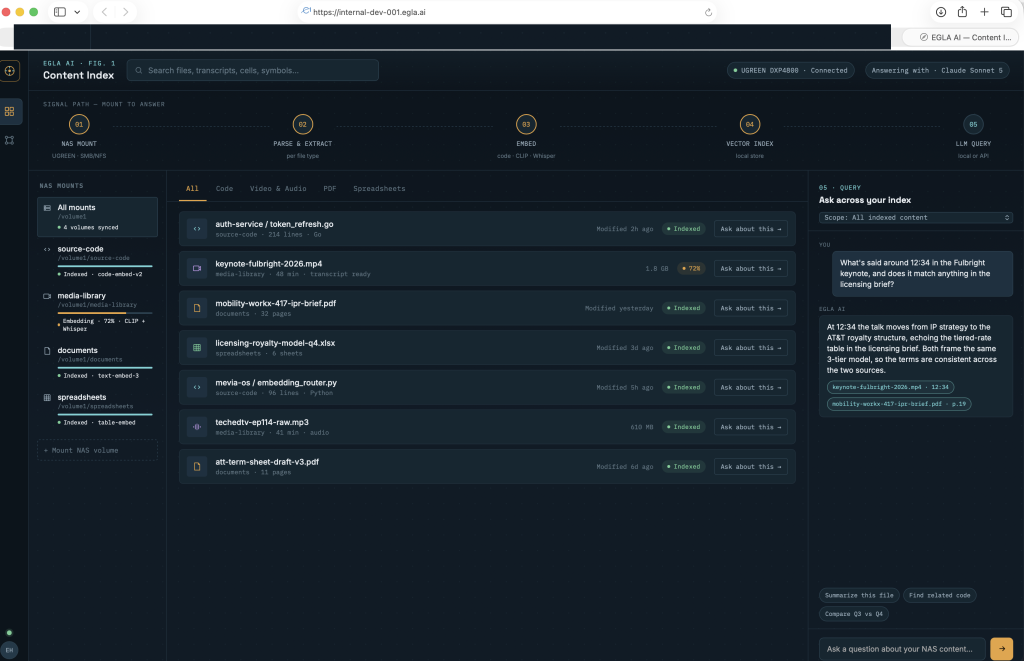
When you have a large fire storage with,: PDF, Movies in MOV, MP4, audio, music, podcasts, DOCX, Excel, all are located in a drive.
And you want to take advantage of AI, you need to create a database of embeddings or vectros:
- .First, you I need to build a system to index them to be searchable
- Second, you may want to be able to separate those databases such that I can identify, certain directories per categories, and a search for all.
Assume you can store the embeddings in an SSD and the rest of SATA Drive,
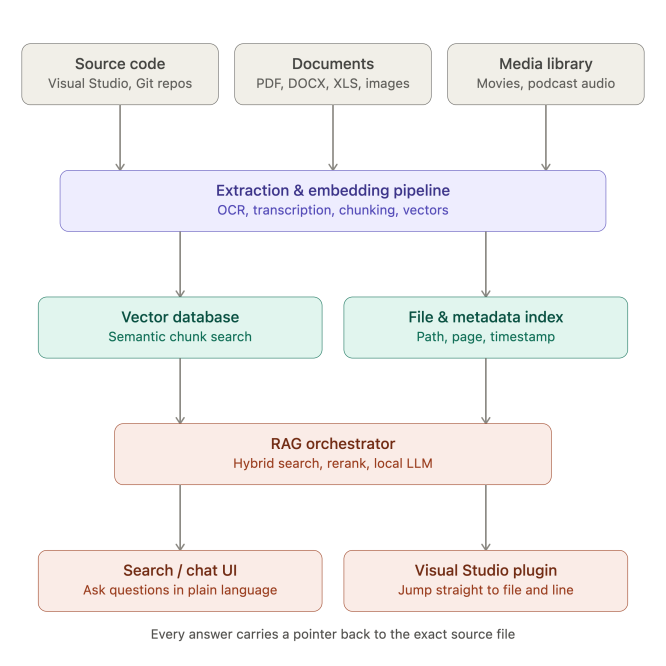
0. The Concept
A few concrete choices for each layer:
Sources → extraction. Code gets parsed with a symbol-aware splitter (tree-sitter, or your language server’s own AST) so chunks respect function/class boundaries, tagged with repo path, commit hash, and line range. PDFs, DOCX, and XLS go through a library like Apache Tika or unstructured.io, keeping page number or sheet/cell reference. Images get a vision-language model for captions (LLaVA or similar runs fine locally) plus OCR for embedded text. Movies and podcasts go through Whisper for time-stamped transcripts, with keyframe extraction on video so visual content gets its own captions too — you embed the transcript segments and captions, never the raw media.
Storage. A self-hosted vector database (Qdrant or Milvus) holds the embeddings; a plain metadata table (Postgres works well) is the piece that actually “points to the file” — absolute path, page/sheet/cell, or timestamp range, keyed to the same chunk ID. This is the part people skip and then can’t answer “where did this come from.”
Retrieval. Hybrid search (vector + keyword/BM25) with a reranker gets you better precision than vector-only, especially across such different content types.
Since you’re already running Ollama, that same runtime can serve both the embedding model and the generation model here, keeping everything local rather than shipping source code and documents to a third party — worth considering given the content includes your source code. And since you’ve already built an MCP server before, exposing this RAG index as an MCP tool would be a natural way to query it from both a chat interface and directly inside Visual Studio, rather than building two separate integrations.
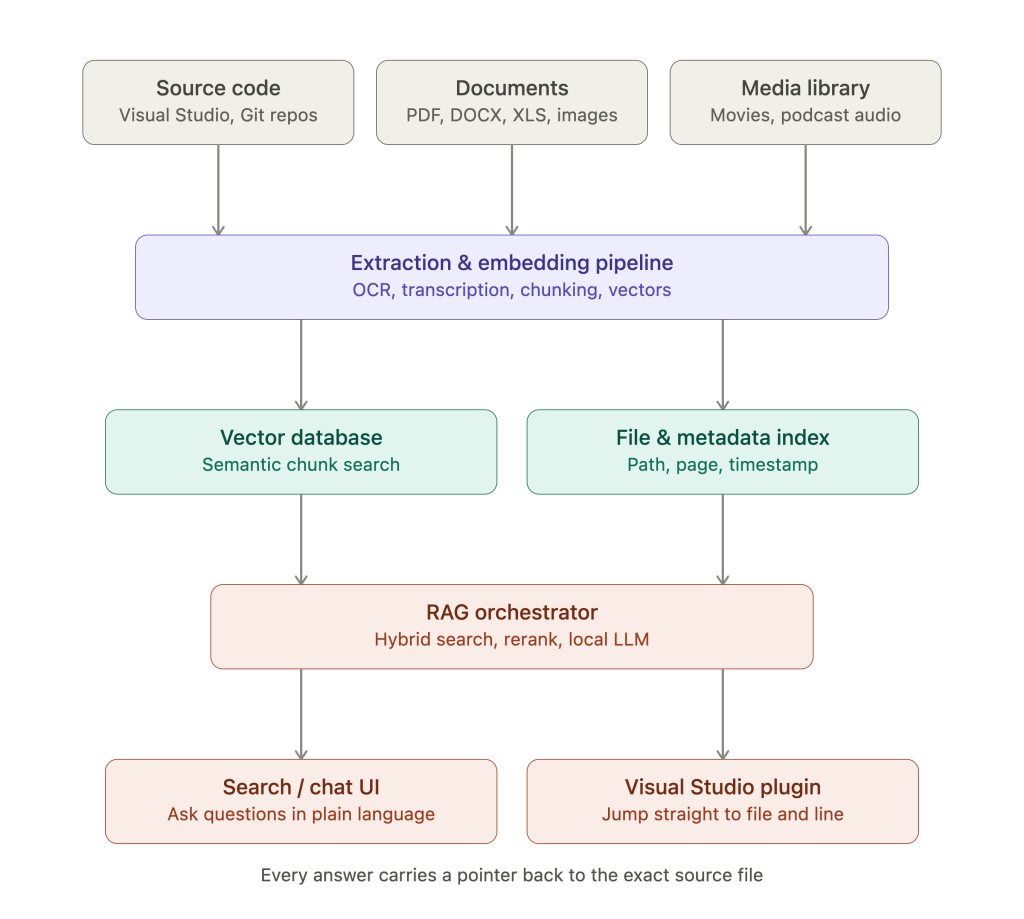
1. The Core Architecture
The system will have three main components:
- The Ingestion Pipeline: A service that walks your file system, reads the files, and sends their content to the next step. For files like PDFs, DOCX, MP4, etc., this involves extraction (converting to plain text or audio) and chunking.
- The Embedding & Vector Storage Engine: This is the heart of your semantic search. It will:
- Use a language model (LLM) or a dedicated embedding model (like
sentence-transformers) to convert text chunks into numerical vectors (embeddings). - Store these vectors in a Vector Database (Vector DB), which is optimized for similarity search.
- Use a language model (LLM) or a dedicated embedding model (like
- The Search Interface: A web interface or API where you can type a query and get back relevant files.
2. Separating Your “Databases” (The Logical Partitioning)
The term “database” in your question can mean two things:
You do not need 80 different physical servers. You can achieve this separation within a single, powerful server using a metadata-tagging strategy:
This way, your single database is logically partitioned, and you can search across everything or drill down into a specific category with a simple filter.
3. Online Research: Solutions and Technologies
I will now search for the most up-to-date, robust, and efficient tools for this task.
 Searched web for “best open source vector database for personal server 2024″Toggle content
Based on the research, here’s a clear, actionable plan for your 10TB (and scalable to 80TB) system.
The Best Path Forward: LanceDB + Open-Source LLMs
After evaluating the top options, LanceDB is the most compelling choice for your specific use case. Here’s why:
Other strong contenders and why they were secondary:
Recommended System Architecture
Here’s how to structure the system to handle your 10TB:
1. Hardware & Memory Requirements (The Crucial Part)
Let’s be realistic about the memory needed. Embeddings are large. You’ll be storing embeddings for every text chunk (e.g., every paragraph of your PDFs, every transcript of your movies). For a 10TB dataset:
- Raw Data: 10TB on your SSD is your “source of truth.”
- Embeddings & Index Overhead: Embedding vectors (e.g., 384-dim or 768-dim) plus index structures add significant overhead. A conservative estimate for your initial 10TB is 15-20TB of storage needed for the index alone.
- Memory (RAM): This is the most important spec for performance.
- You do not need to load the entire 20TB index into RAM.
- You do need enough RAM to hold the working set of your index and run the embedding model.
- Minimum (Slow, but possible): 32GB RAM. This will require heavy disk I/O and be slow for large-scale search.
- Recommended (Balanced): 64GB – 128GB RAM. This will allow you to run fast, approximate nearest neighbor (ANN) searches with HNSW indexes.
- Ideal (Fast & Future-Proof): 256GB+ RAM. If you want the absolute fastest search possible and want to future-proof for your 80TB expansion, this is the best investment.
2. The Ingestion Pipeline (Python-based)
You’ll build a Python script or service. Here’s a high-level w`orkflow for each file:
Step 1: Extract Content
PDF/DOCX: Use PyPDF2 or pdfplumber.
Audio/Movies: This is the hardest part. You’ll need an Automatic Speech Recognition (ASR) tool like OpenAI's Whisper or Vosk to transcribe the audio. You won’t embed the whole movie; you’ll embed the transcription.
Text/Markdown: Read directly.
Step 2: Chunk the Text
Break large files into smaller chunks (e.g., 256-512 tokens). For movies/podcasts, chunk the transcription by time (e.g., 30 seconds of speech).
Step 3: Generate Embeddings
Use a local model to save on cost. For 10TB, cloud APIs (OpenAI, Cohere) would be prohibitively expensive. A great, efficient model is all-MiniLM-L6-v2 (384-dim) from HuggingFace.
Step 4: Store in LanceDB
Each chunk is a record: {"text": "...", "source_path": "...", "category": "movie", "embedding": [...]}.
LanceDB will automatically create the vector index.
2. The Ingestion Pipeline (Python-based)
You’ll build a Python script or service. Here’s a high-level workflow for each file:
- Step 1: Extract Content
- PDF/DOCX: Use
PyPDF2orpdfplumber. - Audio/Movies: This is the hardest part. You’ll need an Automatic Speech Recognition (ASR) tool like
OpenAI's WhisperorVoskto transcribe the audio. You won’t embed the whole movie; you’ll embed the transcription. - Text/Markdown: Read directly.
- PDF/DOCX: Use
- Step 2: Chunk the Text
- Break large files into smaller chunks (e.g., 256-512 tokens). For movies/podcasts, chunk the transcription by time (e.g., 30 seconds of speech).
- Step 3: Generate Embeddings
- Use a local model to save on cost. For 10TB, cloud APIs (OpenAI, Cohere) would be prohibitively expensive. A great, efficient model is
all-MiniLM-L6-v2(384-dim) from HuggingFace.
- Use a local model to save on cost. For 10TB, cloud APIs (OpenAI, Cohere) would be prohibitively expensive. A great, efficient model is
- Step 4: Store in LanceDB
- Each chunk is a record:
{"text": "...", "source_path": "...", "category": "movie", "embedding": [...]}. - LanceDB will automatically create the vector index.
- Each chunk is a record:
3. How to Separate Your “Databases” (Implementation)
You will create a single LanceDB database with multiple collections. Each collection will represent a logical partition.
python
# Example Pseudocode for Ingestion
import lance
import os

# Connect to a local LanceDB database
db = lance.connect("file://path/to/your/lancedb")

# 1. Create collections for each category
pdf_collection = db.create_table("pdfs", schema=..., mode="overwrite")
movie_collection = db.create_table("movies", schema=..., mode="overwrite")
podcast_collection = db.create_table("podcasts", schema=..., mode="overwrite")

# 2. Ingestion loop
for file in all_files:
    # ... your extraction code ...
    content = extract_text(file)
    embedding = generate_embedding(content)

    # Determine the category based on the file's directory or extension
    if file.endswith(".pdf"):
        collection = pdf_collection
        category = "document"
    elif file.endswith((".mp4", ".mov")):
        collection = movie_collection
        category = "movie"

    # Insert into the correct collection with metadata
    collection.add([
        {
            "id": file_id,
            "text": content,
            "embedding": embedding,
            "category": category,
            "source_path": file.path,
            "file_type": file.extension,
            "created_date": file.created_date
        }
    ])
4. Search (The Easy Part)
Once your data is in LanceDB, a search is as simple as this:
python
# Example Pseudocode for Search

# User wants to search "space documentaries" but only in movies
query = "space documentaries"
filter_for_movies = "category = 'movie'"

# LanceDB will use the vector index to find similar content,
# AND apply the SQL filter to narrow it down.
results = movie_collection.search(query).limit(10).to_pandas()

# User wants to search "quantum physics" across everything
results = db.table("pdfs").search(query).limit(10).to_pandas().concat(
              db.table("movies").search(query).limit(10).to_pandas(),
              db.table("podcasts").search(query).limit(10).to_pandas()
           )
User Interface
For the hardware setup you can check out egla.ai and as the product is under development , the UX must be simple and tied to the content being used.